FULL VIEW OR HEAD EATEY. DO NOT MAKE ME GET OUT MY MELON BALLER.
* * *
I am ridiculously proud of this.
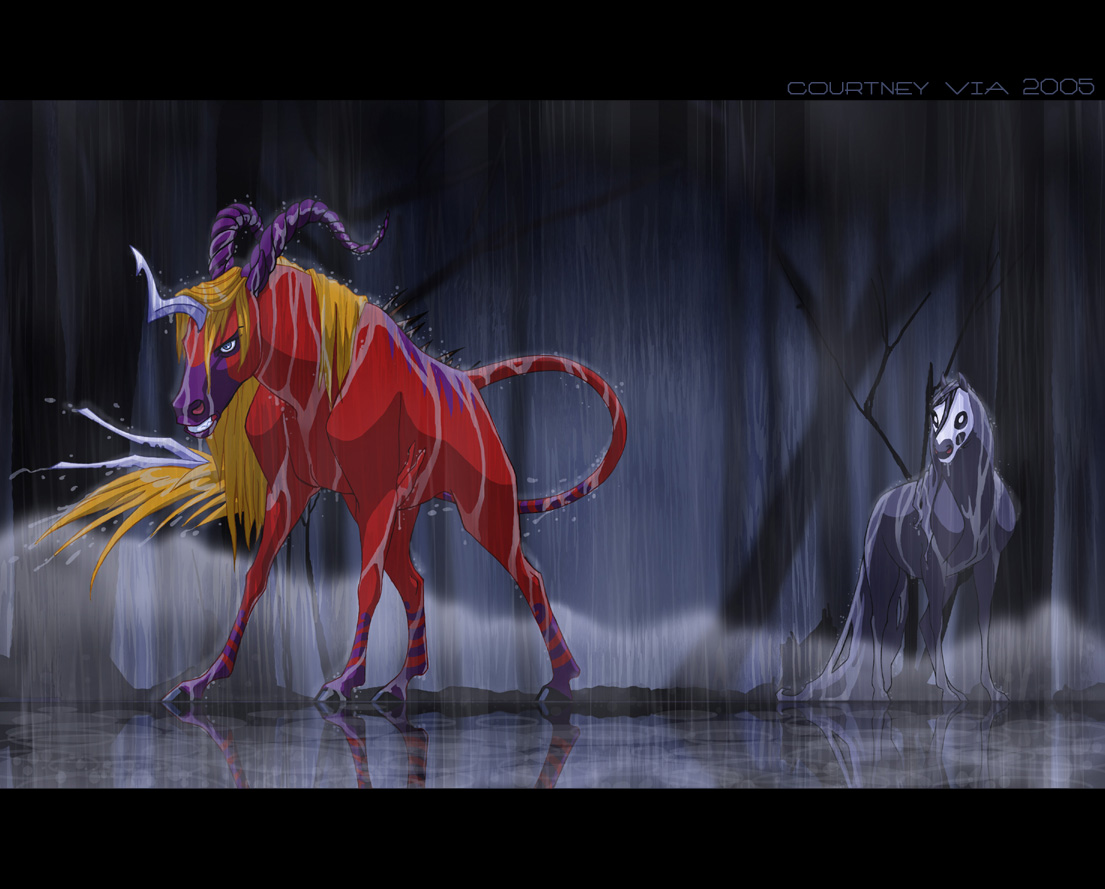
A gift for , because I have been a longtime nerd-fan of hers since before I joined deviantART. This is her character, Shinn, about to throw down with my unnamed death's head horsie. I love my creepy horse, but my money's on Shinn.
I've always loved the pictures that look like cels from animated movies, and I really wanted to try one for myself. I am SO HAPPY with the way this came out!! It took a helluva lot of work (last time I do digital inking!!), but it was absolutely worth it.
Shinn belongs to
Death's Head Horsie belongs to meee. 9_6
Utterly stunning o_o; There isn't a single thing I don't like about this. I'm utterly amazed how beautiful the colorin' is..as well as the slight 'earthworm' camera angle.
Mind givin' a few pointers how the cell shading was done ? o.o;
This totally does look like a cel, right down to the BG painting! Very cool! (and I wouldnt be able to make a horse look angry, like animals always just look like animals when I draw them, Im always impressed by people who make animals look like animals AND have an expression that isnt like "kawaii/disney" XD)
shinn's char is awesome, always so detailed. i'm always afraid of drawing her because she's so complex. yours is awesome too. *pokes the tail* the entire thing is slick. nice cel shading.
--
"Contrary to what most people say, the most dangerous animal in the world is not the lion or the tiger or even the elephant. It's a shark riding on an elephant's back, just trampling and eating everything they see."
All I can say is -wow-
I agree with Frisket-theres just nothing I dont like about this. You should be VERY proud of yourself, this is stunning. I love rain and water scenes, and I am in awe that you can pull it off so well. I...just...wow Im not sure what to say. Its pictures like this that reall strike me, and encourage me to continue to draw and strive for greater expectations. I thank you for that, and for this picture that inspires me so Now, I must +fav, its so beautiful
Sure! (By the by, I'm sorry for being a lurky watcher!! I look at all your pictures and love them ;
The hardest part of this @#$% thing was figuring out how to change the line color. I made a white (not transparent) multiply layer in front of the background and put the lines on that. Then I picked a line color, set my paintbrush to screen, and went to town. The tricky bit is that you can't go over the lines more than once this way without changing the color, so you have to try to get all the lines of the same color in one go. However, if you're a spaz like I am, you can cover up any lines you missed by making a normal layer in front of the line layer, setting the paintbrush back to normal, and touching up.
After I'd gotten that squared away, I made a few multiply layers between the background and the lines and added the trees. I drew them with the feather paintbrush so they'd be all blurry (and to get myself out of having to put a lot of effort into them). On top of the trees, I made a normal layer and colored in the horsies. I deliberately went outside the lines so that the colored lines would show up--otherwise, they'd just look black because of the dark background. Then I went back and erased my mess outside the lines (cheating a bit with the magic wand tool), and voila!
The rain was a bitch. I used a motion blur on the background to give the impression of rain. I then made yet another regular layer and set the opacity to 50% and roughed in some rain with the rectangle tool and a small brush. Then I used a bigbigbig feathered eraser set on 18% to fuzz out the harsh lines. The reflection was super-easy--I just copied the lower half of the picture, pasted it into a new document, flipped it, and pasted it back. The ellipse tool gave me the ripples, and more paintbrushing made the water droplets.
WHAT ARE YOU TALKING ABOUT ALL ANIMALS LOOK KAWAII. SEE THAT SHARK?? KAWAIIIIII!!! *eaten!*
*jumps on you* HI NYANKO!! I have been a bad watcher for you, too ; ; I can't ever seem to think of anything to say besides "DURRR PRETTY," and I figured you probably get enough of that. But I'll be better! I swear!!
DeviantART and Wacom are proud to present the second Intuos4 "Bring Your Vision To Life" contest! Open to all artists all over the world, we challenge you to show us your dreams and aspirations for the future. Get drawing!
DeviantART and the martial arts action film, Ninja Assassin, have teamed up to allow ALL deviants the ability to install Journal Skins! Select an awesome Ninja Assassin skin or choose the skin of your choice.
DeviantART is proud to present the new dAPRO Camera Bag! With amazing quality and tons of features, it's perfect for all your photography needs. Watch our demo video to learn all about it!
Daily Literature Deviations is a group that is dedicated to bringing literature to the forefront of the deviantArt community. We attempt to accomplish this by daily featuring Literature artists from around the community that deserve the recognition, but are not getting it.
Each day we will feature 5 deviations from the Literature categories in a News Article. In order to support the artists that we feature, we ask that you the news article as well as check out the individual pieces. We understand that each day you may not be able to check out each and every one of the pieces, everyone has their own things going on. We just ask that you make an attempt to help support the growing Literature community.
Adobe Photoshop es una herramienta increíble, tanto para fotógrafos como para diseñadores gráficos. Aquí tenéis 16 trucos para principiantes que os ayudarán a comprender mejor las bases de Photoshop.
The Deviousness Award is an accolade which is traditionally handed out on the 1st of every month to one trully outstanding deviant. `Cyantre is one of the most helpful deviants within our community. With a positive attitude and a resourceful mind, you can always find him providing support and encouragement to those in need. Always looking for ways in which he can get more involved in our community, John's positive presence is to be aspired to. A well respected poet, John is a must-have on your deviantWATCH to make sure that you don't miss out on your dose of community inspiration. It's with great pleasure that the Deviousness Award for November 2009 goes to... Read More
Comments
Mind givin' a few pointers how the cell shading was done ? o.o;
--
Welcome to our humble madhouse... I trust you'll find yourself at home. -Quills
you = pimp.
--
"Contrary to what most people say, the most dangerous animal in the world is not the lion or the tiger or even the elephant. It's a shark riding on an elephant's back, just trampling and eating everything they see."
~Jack Handy, SNL
I agree with Frisket-theres just nothing I dont like about this. You should be VERY proud of yourself, this is stunning. I love rain and water scenes, and I am in awe that you can pull it off so well. I...just...wow
--
Mweor.com
Join Today!
The hardest part of this @#$% thing was figuring out how to change the line color. I made a white (not transparent) multiply layer in front of the background and put the lines on that. Then I picked a line color, set my paintbrush to screen, and went to town. The tricky bit is that you can't go over the lines more than once this way without changing the color, so you have to try to get all the lines of the same color in one go. However, if you're a spaz like I am, you can cover up any lines you missed by making a normal layer in front of the line layer, setting the paintbrush back to normal, and touching up.
After I'd gotten that squared away, I made a few multiply layers between the background and the lines and added the trees. I drew them with the feather paintbrush so they'd be all blurry (and to get myself out of having to put a lot of effort into them). On top of the trees, I made a normal layer and colored in the horsies. I deliberately went outside the lines so that the colored lines would show up--otherwise, they'd just look black because of the dark background. Then I went back and erased my mess outside the lines (cheating a bit with the magic wand tool), and voila!
The rain was a bitch. I used a motion blur on the background to give the impression of rain. I then made yet another regular layer and set the opacity to 50% and roughed in some rain with the rectangle tool and a small brush. Then I used a bigbigbig feathered eraser set on 18% to fuzz out the harsh lines. The reflection was super-easy--I just copied the lower half of the picture, pasted it into a new document, flipped it, and pasted it back. The ellipse tool gave me the ripples, and more paintbrushing made the water droplets.
I hope that helped!! Gawd, I'm long winded. 9_6
*jumps on you* HI NYANKO!! I have been a bad watcher for you, too ; ; I can't ever seem to think of anything to say besides "DURRR PRETTY," and I figured you probably get enough of that. But I'll be better! I swear!!
--
PRIATES OF THE CARRABEAN.
I spent so long trying to draw Shinn, and I still forgot the line down her forehead and her feety floof. I lose. ; ;
Previous Page12345...Next Page